Learn how to create a button with JSON that downloads a file from a SharePoint Library
The use case
We can take advantage of the always open files of this type, when a specific file is downloaded
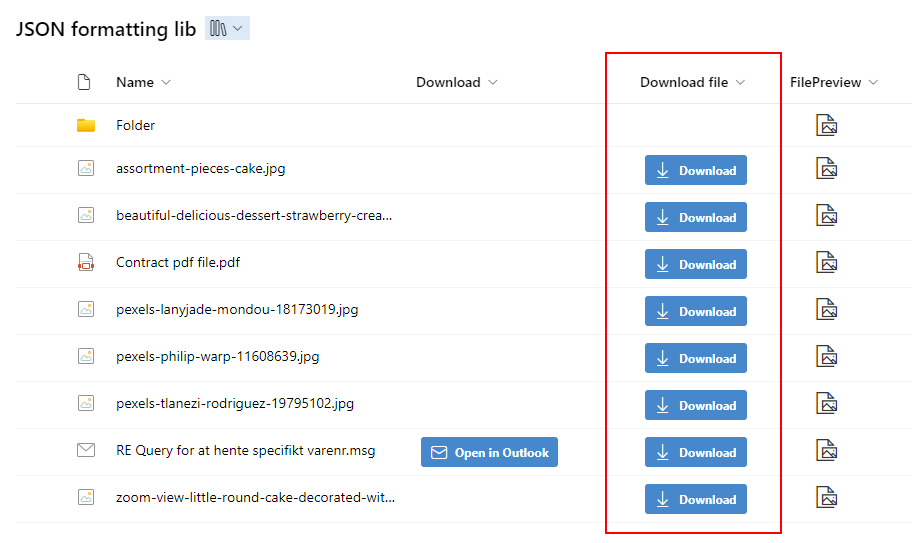
Step 1
Insert below JSON code to the column formatting to create a button that will download the file from a SharePoint library
{
  "$schema": "https://developer.microsoft.com/json-schemas/sp/v2/column-formatting.schema.json",
  "elmType": "div",
  "style": {
    "align-items": "center",
    "margin-top": "2px",
    "margin-bottom": "2px",
    "display": "=if([$File_x0020_Type] != '', 'flex', 'none')"
  },
  "children": [
    {
      "elmType": "a",
      "attributes": {
        "href": "= @currentWeb + '/_layouts/15/download.aspx?UniqueId=' + [$UniqueId]",
        "target": "_self",
        "class": "ms-bgColor-themePrimary ms-fontWeight-bold ms-bgColor-themeDarker--hover"
      },
      "style": {
        "height": "30px",
        "text-decoration": "none",
        "display": "flex",
        "align-items": "center",
        "text-align": "center",
        "justify-content": "center",
        "margin": "5px",
        "color": "#fff",
        "border-radius": "3px"
      },
      "children": [
        {
          "elmType": "span",
          "attributes": {
            "iconName": "Download",
            "class": "ms-fontSize-16 ms-fontWeight-regular",
            "title": "Details"
          },
          "style": {
            "color": "#fff",
            "flex": "none",
            "margin-right": "8px",
            "margin-left": "10px"
          }
        },
        {
          "elmType": "span",
          "style": {
            "margin-right": "10px"
          },
          "txtContent": "Download"
        }
      ]
    }
  ]
}
When the file has been downloaded right click on the file and select always open files of this type
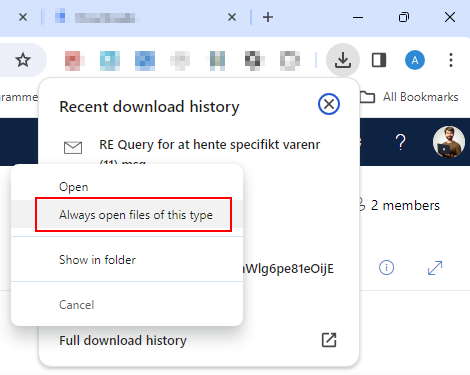
Note that there is a potential risk, since your browser will automatically open all files downloaded of this specific file
Automatically download and open mail files.
We can change the code a little, so that we only show the button for specific file types. In this case we will only show the button when the filetype is msg
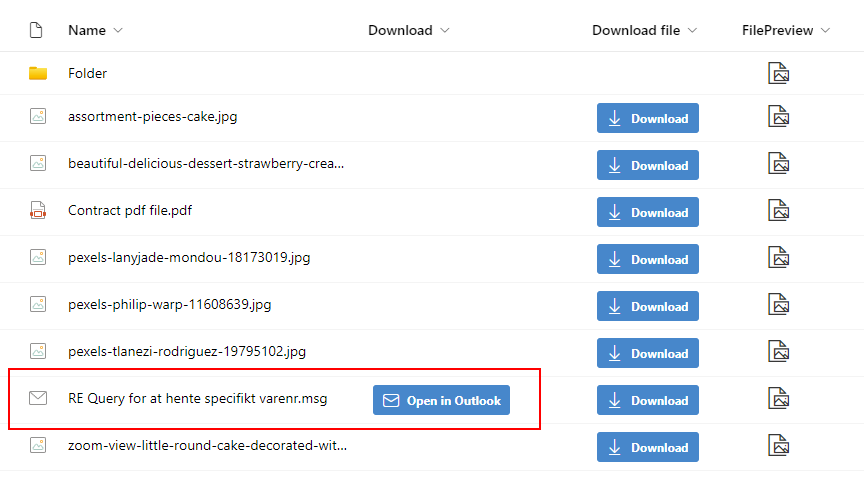
When we click the button the file is then downloaded locally, and automatically opened up in Outlook
{
  "$schema": "https://developer.microsoft.com/json-schemas/sp/v2/column-formatting.schema.json",
  "elmType": "div",
  "style": {
    "align-items": "center",
    "margin-top": "2px",
    "margin-bottom": "2px",
    "display": "=if([$File_x0020_Type] == 'msg', 'flex', 'none')"
  },
  "children": [
    {
      "elmType": "a",
      "attributes": {
        "href": "= @currentWeb + '/_layouts/15/download.aspx?UniqueId=' + [$UniqueId]",
        "target": "_self",
        "class": "ms-bgColor-themePrimary ms-fontWeight-bold ms-bgColor-themeDarker--hover"
      },
      "style": {
        "height": "30px",
        "text-decoration": "none",
        "display": "flex",
        "align-items": "center",
        "text-align": "center",
        "justify-content": "center",
        "margin": "5px",
        "color": "#fff",
        "border-radius": "3px"
      },
      "children": [
        {
          "elmType": "span",
          "attributes": {
            "iconName": "Mail",
            "class": "ms-fontSize-16 ms-fontWeight-regular",
            "title": "Details"
          },
          "style": {
            "color": "#fff",
            "flex": "none",
            "margin-right": "8px",
            "margin-left": "10px"
          }
        },
        {
          "elmType": "span",
          "style": {
            "margin-right": "10px"
          },
          "txtContent": "Open in Outlook"
        }
      ]
    }
  ]
}