Learn how to change the value of a column into today’s date with a single click
If you are using your SharePoint list as maybe a list of tasks, or it could be a list of projects, it could be a good idea to make an easy way for the user to mark the task/project as completed
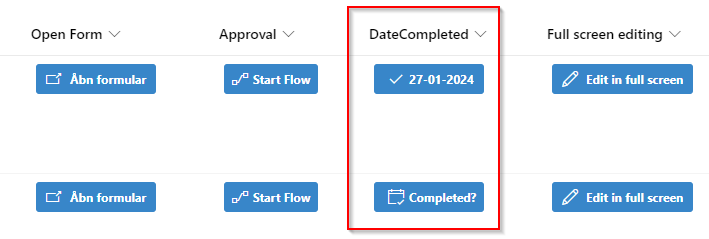
This button when selected will insert the current date into the column (so it is important that you create the column as a date column)
If the user clicks the button by fault, they can click the date again and the date is removed.
I like to have all of my content that the user can interact with as buttons. I found this example from the PNP List formatting Github which I really liked, so all I had to do was to implement it into my own style
The PNP List Formatting has many examples, and they are free to use! I even added my own example to the repository
{
  "$schema": "https://developer.microsoft.com/json-schemas/sp/v2/column-formatting.schema.json",
  "elmType": "div",
  "style": {
    "align-items": "center",
    "margin-top": "2px",
    "margin-bottom": "2px"
  },
  "children": [
    {
      "elmType": "button",
      "customRowAction": {
        "action": "setValue",
        "actionInput": {
          "DateCompleted": "=if(Number(@currentField) == 0, getYear(@now)+'-'+padStart(toString(getMonth(@now)+1),2,'0')+'-'+padStart(toString(getDate(@now)),2,'0'), '')"
        }
      },
      "attributes": {
        "class": "ms-bgColor-themePrimary ms-bgColor-themeDarker--hover ms-fontColor-white",
        "title": "=if(Number(@currentField) == 0, 'Click to mark complete', 'Completed on ' + @currentField.displayValue)"
      },
      "style": {
        "border": "none",
        "cursor": "pointer",
        "display": "flex",
        "align-items": "center",
        "justify-content": "left",
        "height": "30px",
        "width": "110px",
        "border-radius": "3px",
        "margin": "5px"
      },
      "children": [
        {
          "elmType": "span",
          "attributes": {
            "iconName": "=if(Number(@currentField) == 0, 'EventAccepted', 'CheckMark')",
            "class": "ms-fontSize-16 ms-fontWeight-regular"
          },
          "style": {
            "margin-right": "5px",
            "margin-left": "8px"
          }
        },
        {
          "elmType": "span",
          "txtContent": "=if(Number(@currentField) == 0, 'Completed?', '@currentField.displayValue')",
          "style": {
            "margin-right": "8px",
            "flex": "none"
          },
          "attributes": {
            "class": "ms-fontSize-12 ms-fontWeight-bold"
          }
        }
      ]
    }
  ]
}
You don’t have to do much to make this work, however it is important that you change the “DateCompleted”, into the INTERNAL name of your own column